Case Study · Product Design · Desktop Tool · Personal Project · 2026

Yimu 譯幕

Live translated subtitles for the desktop — a floating window that turns anything my computer plays into the language I choose, in real time. No subtitle track required, no platform lock-in, with Taiwan-specific localization when I choose Traditional Chinese.

Speech-Native Translation · Gemini Live API · OpenAI Realtime · Consent-Gated AI Summaries · Python, Zero Framework

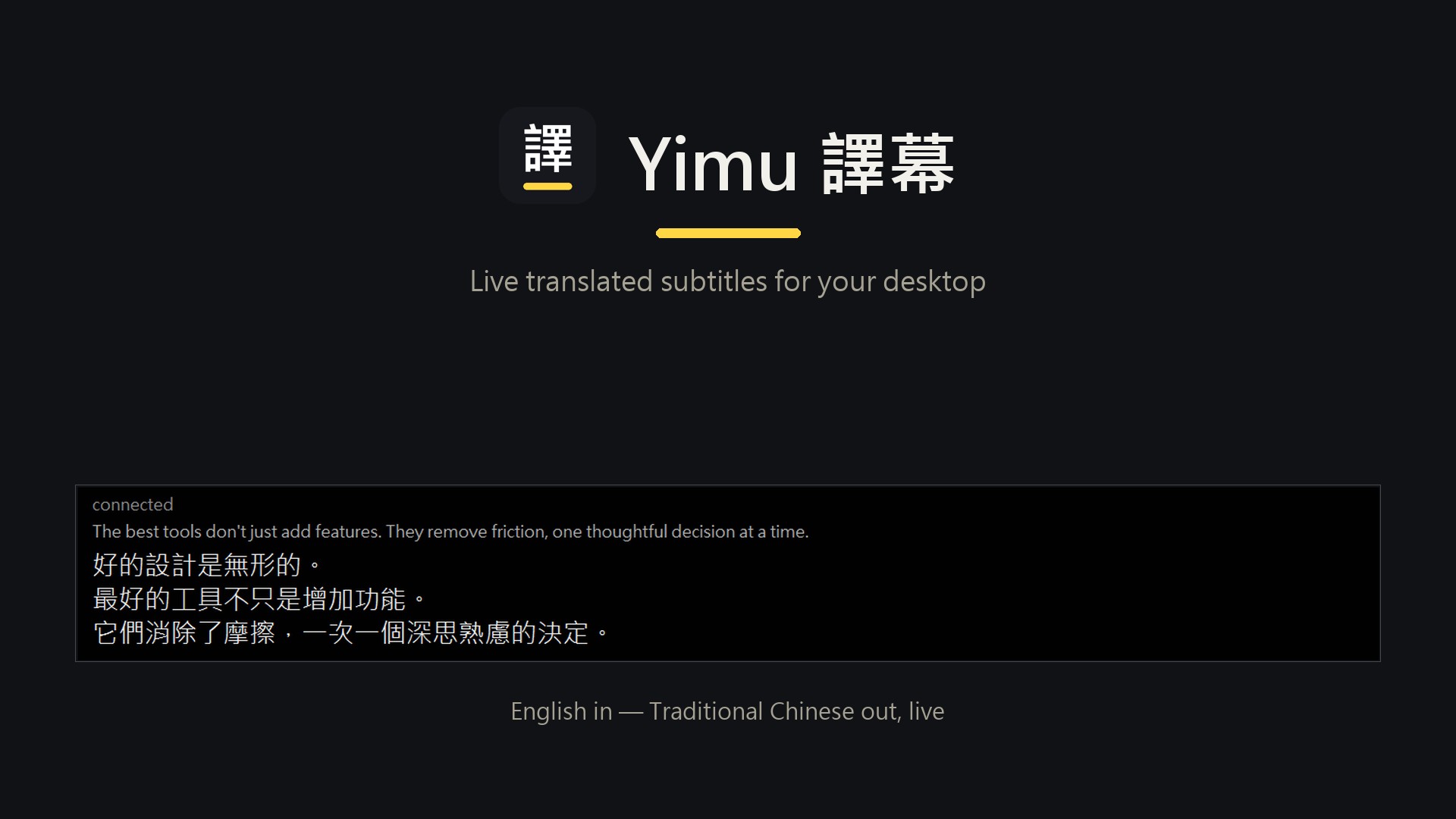
Yimu brand lockup — the 譯 logo and wordmark above an enlarged view of the subtitle window, showing an English sentence and its three-line Traditional Chinese translation, captioned: English in, Traditional Chinese out, live.

Problem
Watching English lectures, meetings, and videos means constantly pausing to catch what I missed. Existing subtitle tools bind to specific platforms, need an existing caption track, and treat Traditional Chinese as an afterthought.
Built
A Windows tool that captures whatever the computer is playing and shows live subtitles in a chosen target language — two switchable speech-native engines, meeting features (timestamped transcripts, local speaker labels, microphone mixing), and on-demand AI summaries that never send text without confirmation.
My Role
I defined the product, wrote the build plan, named it, designed the logo and the subtitle window's behavior, set every acceptance test, and directed the AI that wrote the code — then found the bugs a real user finds.
2Speech-native engines, hot-switchable
<3sSpeech-to-subtitle latency
37Offline regression tests
1 dayFrom written plan to first working version

One minute, subtitles on everything.

The demo below is a real session, recorded end to end: English narration starts playing, and Yimu's floating window builds the Traditional Chinese subtitles live — source transcription above, translation below. What the narration says about good design, the tool quietly demonstrates.

Sound on — the point is hearing English while reading Chinese. The subtitles you see were produced in real time during this recording, not added in post.


Designed for one very specific user: me.

I watch a lot of English content — lectures, design talks, meetings, YouTube. My English is fine, but listening at full speed for an hour is real cognitive load, and the moment something important lands, I'm pausing and scrubbing back. I wanted subtitles that just exist, for everything, without asking whether the platform provides them.

The tools I tried all had the same three gaps:

  • Platform-bound — browser extensions translate YouTube's caption track. No track, no captions. Meetings, livestreams, and podcasts are out.
  • Text-layer translation — most tools transcribe first, then translate the text, adding a full extra step of latency.
  • Traditional Chinese as an afterthought — output tuned for Simplified Chinese, with mainland phrasing like 人工智能 where Taiwan says 人工智慧.

So the product definition wrote itself: capture the system's own audio, translate the speech itself rather than a transcript, and make Taiwan-flavored Traditional Chinese the first-class output — not a checkbox.


A written plan, staged acceptance, and an AI pair of hands.

The first working version was a one-day build, but not an improvised one. I started from a written implementation plan — four stages, each with its own acceptance test — and directed Claude Code through it while owning every decision about what "done" meant. The product kept evolving after that first day because I kept using it.

  1. 01

    Audio capture

    Loopback-capture whatever Windows is playing, resample to what the translation APIs expect. Accepted only after recording real audio and checking it by ear for pitch and speed.

  2. 02

    Translation session

    Stream audio to Gemini's live translation model, receive target-language text deltas, survive disconnects with backoff. Accepted when real speech produced fluent streaming output.

  3. 03

    The subtitle window

    Frameless, always-on-top, semi-transparent, draggable — subtitle conventions people already know. Accepted through automated UI checks and real-screen validation.

  4. 04

    Integration — then iteration

    Wire it together, then keep going: a settings panel, a second engine, selectable target languages, meeting transcripts, consent-gated AI summaries, and the long tail of bugs that only real daily use reveals.

The rule that shaped everything: nothing counts as done until it survives a real test — real audio through real speakers, real API sessions, a real window on a real screen. "The code looks right" was never accepted as evidence.


Sound in, subtitles out — nothing in between.

Most subtitle tools run a two-step relay: speech recognition produces text, then a translation model translates the text. Yimu skips the relay. Both engines it supports are speech-native — the audio stream goes in, translated text comes out of a single model built for exactly this.

The pipeline

Input

Whatever is playing

System audio via WASAPI loopback — videos, meetings, livestreams, podcasts. No caption track needed, no per-app setup.

Capture

Resample per engine

stereo → mono PCM · 16kHz Gemini / 24kHz OpenAI

Each engine declares the sample rate it needs — sending the wrong one would pitch-shift the audio and garble every translation.

Translate

Speech-native session

Gemini Live · or OpenAI gpt-realtime-translate

Streaming translation with automatic reconnect and backoff. The engines are swappable behind one contract: audio queue in, text callback out.

Localize & filter

Target-language output

language selection · OpenCC s2twp · echo suppression

The user chooses the target language. When that target is Traditional Chinese, OpenAI's Simplified-only output passes through a client-side Taiwan-phrasing layer; an echo filter keeps Chinese input from being parroted back.

Output

The floating window

Frameless, always on top, draggable — translation and source lines each with their own adjustable budget, optionally saved to a timestamped transcript, and designed to stay quiet when the source already matches the target language.

Local-first by design: no server, no account, no proxy layer. Live audio goes from the machine to the selected translation API. Transcript text stays local unless I explicitly approve an AI summary request; keys live in a local .env.

Errors surface, never vanish: a dead audio device, an invalid key, a rate limit — each one shows up in the subtitle window's status line in plain language. Silent failure was treated as a bug class of its own.

After the live session

When transcript saving is enabled, Finish closes one logical session and offers an optional structured summary in the current target language. Before any text leaves the computer, Yimu shows the provider, character count, and estimated request count and waits for confirmation.

  • Useful source, not just convenient source — the summary prefers the original-language transcript when available and falls back to the translation only when necessary.
  • Long sessions stay bounded — large transcripts are summarized in chunks and reduced into one structured result instead of being forced through one oversized request.
  • The record remains mine — the result is saved beside the transcript as a new Markdown file without overwriting earlier summaries; OpenAI summary requests set store=False.

In use

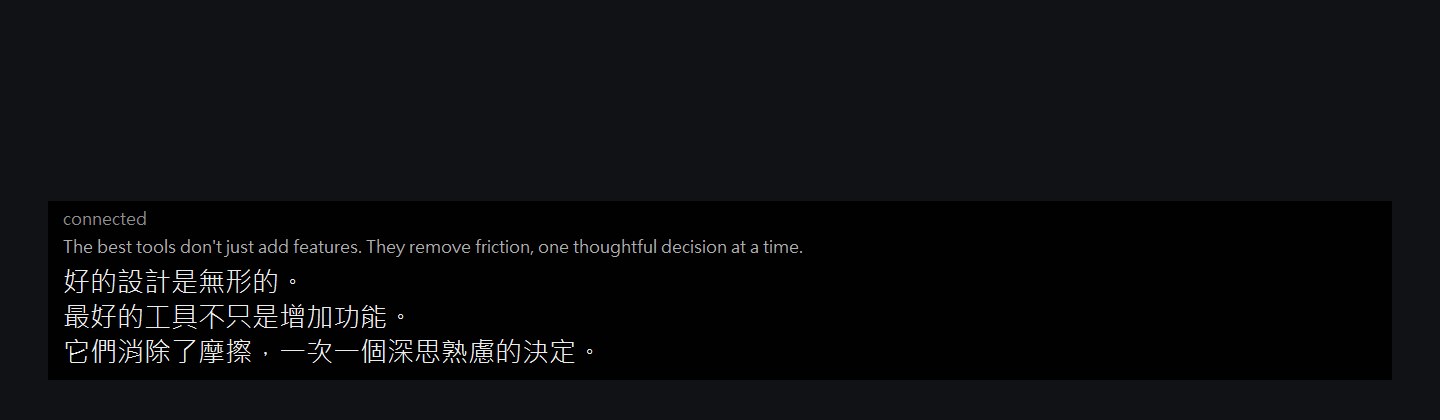
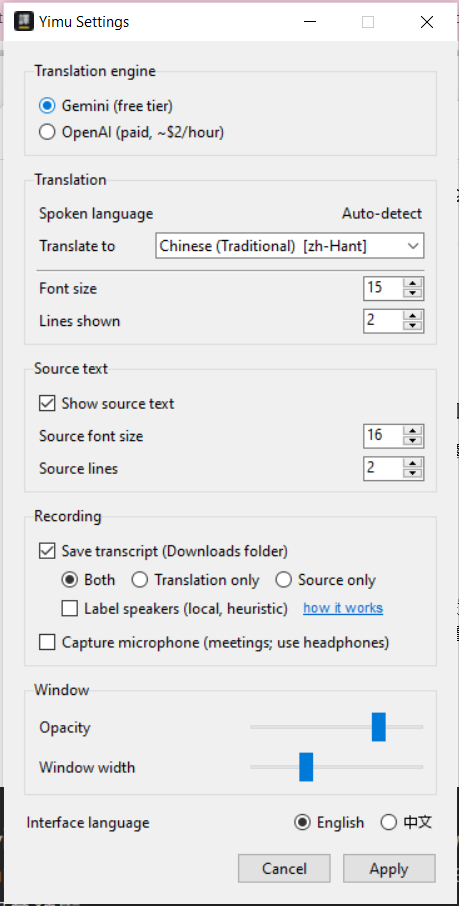
The subtitle window in 3-line mode: English source transcription in gray above three lines of Traditional Chinese translation on a black bar. The current Yimu subtitle bar while listening: connected status, Waiting for audio message, and the two session controls, Finish and Pause. The current Yimu settings panel: Gemini and OpenAI engines, automatic source-language detection, a selectable Traditional Chinese target, source-text controls, transcript and microphone options, window controls, and interface language.

What I chose — and what I rejected.

Speech-native over the Whisper relay

The open-source standard is local Whisper transcription plus text translation — free, private, but slow and sentence-at-a-time. I chose streaming speech-native APIs for one reason: subtitles are only useful if they keep pace with the speaker.

Localization as a real layer, not a setting

When OpenAI's endpoint turned out to only output Simplified Chinese, the fix wasn't "close enough" — it was a conversion layer with Taiwan phrasing (人工智慧, not 人工智能), so both engines read identically to a Taiwanese eye.

Local tool, no cloud

Every serious project I'd built before had a serverless proxy guarding API keys. Here I rejected my own default: a single-user desktop tool gains nothing from a proxy except latency. Knowing when a pattern doesn't apply is the point of having patterns.

Subtitle conventions, not app conventions

No traditional title bar or app chrome — a black bar, live text, and only two visible session controls: Finish and Pause. It stays bottom-center, drags to move, and keeps the subtitles visually dominant. People have watched subtitles their whole lives; the best UI here is the one they've already learned.

Durable by default, not by luck

Every transcript sentence flushes to disk the instant it's captured, not when the session ends cleanly — a crash or a forced quit can't cost you the record. A meeting transcript that might silently vanish isn't worth building at all.

Speaker labels: a heuristic, not a promise

Diarization runs locally — no cloud service, no per-minute cost — but voice clustering isn't identity verification. The settings panel says so directly, with a plain-language explainer next to the toggle, rather than letting confident-looking 講者 1/2/3 labels imply more certainty than the model has.

Consent before AI convenience

A summary is useful, but a transcript can contain an entire private meeting. Yimu never treats "Finish" as blanket permission to upload it: the confirmation names the provider and shows how much text and how many requests will be sent. If transcript saving is off, Finish simply stops — no warning for a record that does not exist.

The engine switch also has an honest cost story: Gemini live translation has a free tier; OpenAI costs about $2/hour and the settings panel says so right on the radio button. Summary requests are billed separately by text tokens, so Yimu estimates the number of requests before asking for consent. A tool for one user has no excuse for hidden costs.


The bugs that only real use finds.

The most interesting engineering in this project wasn't a feature — it was five bugs where every component behaved "correctly" and the system still failed.

  • The parrot problem — the API promises to stay silent when the input is already Chinese. Its audio stays silent; its transcript stream cheerfully echoes the input word for word. The docs never mention it. Fixed with a client-side echo filter that compares output against recent input — in both Chinese scripts, since the echo can come back in a different one.
  • The unfinished sentence — I noticed OpenAI never finished translating the last sentence after pausing a video, while Gemini did. Root cause: OpenAI waits to hear trailing silence before finalizing — but Windows loopback capture sends nothing at all when playback stops, so the silence it was waiting for never arrived. The fix feeds a short, capped burst of synthetic silence when the stream stalls. Capped, because the API bills by audio minute — unlimited politeness would cost real money.
  • The swallowed error — Python's TaskGroup wraps child exceptions, which silently defeated the error handling: a dead microphone path would reconnect forever instead of reporting. A code-review pass caught it; regression tests now simulate the wrapped failure.
  • The missing English line — on OpenAI, the source-language subtitle simply never showed up — and, invisibly, the echo filter had stopped working too, since both depend on the same input-transcript stream. Cause: OpenAI's input transcription is opt-in, and one absent config block had silently disabled two features. The fix was a single session setting; noticing it took daily use.
  • The schema that was too strict — the summary feature passed a valid Pydantic schema through the Gemini SDK, which serialized one strictness flag into a field the API did not accept. The request failed before the model saw the transcript. The fix separated the provider-compatible generation schema from strict final validation — looser at the boundary, still strict before anything is saved.

The pattern across all five: the failure lived between systems, not inside any of them. Each API, each OS layer, each language feature behaved as documented — the design work was in the seams.


How I used AI in this project

This project was built in collaboration with AI; the design decisions, content, and direction are mine. I did not write this codebase line by line — and being precise about the split is the point:

  • AI did — the implementation: audio capture, both translation engine integrations, the tkinter window, the settings panel, transcript and summary pipelines, the automated test suites, and the API research against current documentation.
  • I did — the product: the problem definition, the written build plan, the four-stage acceptance gates, the name, the logo direction, every UX call (window behavior, panel placement, what settings deserve to exist, and when transcript text may leave the computer), the cost policies, and the bug reports from daily use — including the one-sentence repro that cracked the silence-finalization bug.
  • What made it work — staged acceptance instead of blind trust. Every stage had a test I defined before the code existed, and "it runs" was never confused with "it's right".

A tool I actually use, every day.

Yimu isn't a prototype or a portfolio prop — it runs on my desktop daily, translating lectures and meetings, saving the sessions I choose, and turning the useful ones into structured summaries. Every visual and behavioral detail in the settings panel — target language, line counts, font sizes, window width, opacity, whether to record — exists to be retuned, not set once and forgotten; I change mine often enough that I stopped writing specific numbers into this page. The bug list above exists because it gets real use.

Real-time subtitle translation is a crowded category. What this project claims isn't novelty — it's timing and care: one of the first Windows implementations on the speech-native translation APIs that appeared in 2026, with the localization details done right for one specific audience. Sometimes the most useful thing a tool can do is simply stay out of your way.

Watch it keep up.

The demo says more than any feature list — English in, Traditional Chinese out, live.