Rehello
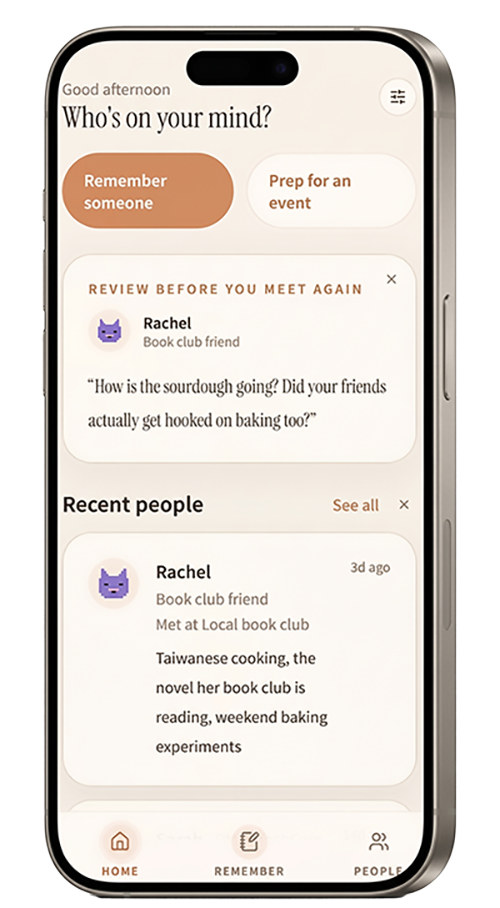
A mobile app for saving details from a conversation and reviewing them before meeting again.
Next.js · TypeScript · GPT-5.6 · OpenAI Responses API · Zod


- Problem
- I am an introvert, and my main difficulty is starting a conversation, sometimes even with people I have met several times. I wanted an app that could remind me of something the other person cares about, so the silence has somewhere to go. Rehello started there: a way to record the few details I remember from a conversation and return to them before the next one. I designed it for introverts and people who find socializing tiring.
- Process
- The original experience used guided questions. I later added Quick Remember, which turns a freeform note into a draft recall card, while keeping the guided flow available. Work with Codex covered implementation and review, including how visitors try the app and what happens to their notes.
- Result
- The working MVP gives users a way to save details from conversations and review them before meeting someone again. Rehello launched as part of Product Hunt’s OpenAI Day and was featured on the platform.
Context
After the conversation
I wanted Rehello to accommodate someone who remembers only part of an interaction. They might have a name and a topic they discussed, without enough information to fill out a detailed profile.
That shaped the tone of the app. Prompts use conversational language, and reminders are optional. The interface does not assign relationship scores or ask users to maintain a streak.
The mobile focus came from the intended moments of use: shortly after meeting someone or before seeing them again. Rehello keeps a phone-sized layout on desktop as well. The MVP does not have a separate desktop workspace.
Capture options
From guided questions to Quick Remember
The original Remember flow asks nine questions, one at a time. Quick Remember added another way to begin: users can enter the fragments they already have in a single note.
Both remain available, along with a fixed example for visitors exploring the app.
| Option | What the visitor does | AI request |
|---|---|---|
| Ready-made example | Opens a sample recall card | None |
| Quick Remember | Submits a personal note using their own OpenAI API key | One request per attempt |
| Guided capture | Answers the original prompts one at a time | None |
Quick Remember accepts a note of 20–1,200 characters. GPT-5.6 organizes it into seven fields covering the person’s name, a short description, where they met, an impression, conversation topics, a memorable detail, and a possible question for next time.
The model is instructed to use the submitted note and leave unknown information empty. A strict schema checks the output’s structure. It cannot establish whether every detail is correct.
The resulting card therefore opens as a draft. Users can choose Adjust the details to continue in the guided flow or save the card. Generation alone does not add a person to their records.
My Role
My role and AI collaboration
Rehello was built in collaboration with AI; the design decisions, content, and direction are mine.
I chose the product’s focus on social memory and set the interaction tone. Later decisions included keeping the guided flow, adding a fixed example that required no API request, and requiring visitors to supply their own key for personal-note generation.
Codex supported implementation and debugging, added automated checks, and documented the work. The Quick Remember development record identifies my product direction and approval separately from that implementation work.
Recall & Prep
Before the next conversation
Saved encounters appear within a person’s profile, so users can return to earlier details as well as the latest meeting. Recall cards provide a shorter view when they want a quick reminder.
Prep offers conversation starters for different settings and draws topics from saved encounters locally. Someone preparing for an event can review those topics without submitting their history to the model.
Reminders appear inside Rehello. The current version does not send push, email, or text notifications.
AI Requests
Trying the app and submitting a personal note
I selected the fixed demo so visitors could explore the review flow without providing a key. For their own notes, Quick Remember uses a visitor-supplied OpenAI API key for that attempt.
The interface explains that the note and key pass through Rehello’s server to OpenAI. Saved conversation history is not included in that request. The app clears the key afterward and excludes it from browser storage and backups.
The BYOK development record also documents a problem found during browser checks. An analytics script loaded on the welcome page remained active after navigation to the key-entry screen. Codex removed the integration from the app.
This version lets visitors explore a sample immediately, but generating a personal card still requires an API key. That is a limitation of the current experience.
Storage & Mobile
Keeping and recovering records
People, encounters, and reminders are stored in the current browser. There is no account or automatic synchronization between devices.
Settings provides manual JSON backup and restore. Clearing the browser’s site data can remove saved records, so the backup is important for anyone who wants to keep them. The exported file is readable JSON and is not encrypted by Rehello.
The app includes PWA installation metadata, but this version does not promise offline support.
Mobile implementation work addressed changing viewport height, safe areas, and bottom-navigation placement. These details mattered because the same phone-sized interface carries the user between capture, profiles, and recall.
Review
Verification and the next study
The BYOK implementation was checked with automated route tests using a mocked provider. Browser checks confirmed that the fixed demo made no API request and that the key was absent from browser storage and exported backups. CI also runs lint and a production build.
Those checks establish specific implementation behavior. The next study should examine whether the saved information is useful when someone returns.
I would ask participants to record a recent conversation, then revisit the card before another interaction. The study would look at which details they correct, whether they prefer guided questions or a freeform note, and what they actually use from the card afterward.