Kickoff Buddy
An AI-powered World Cup companion for first-time soccer fans.
Original Competition Version · IBM Granite / watsonx.ai · Product Design · AI Collaboration
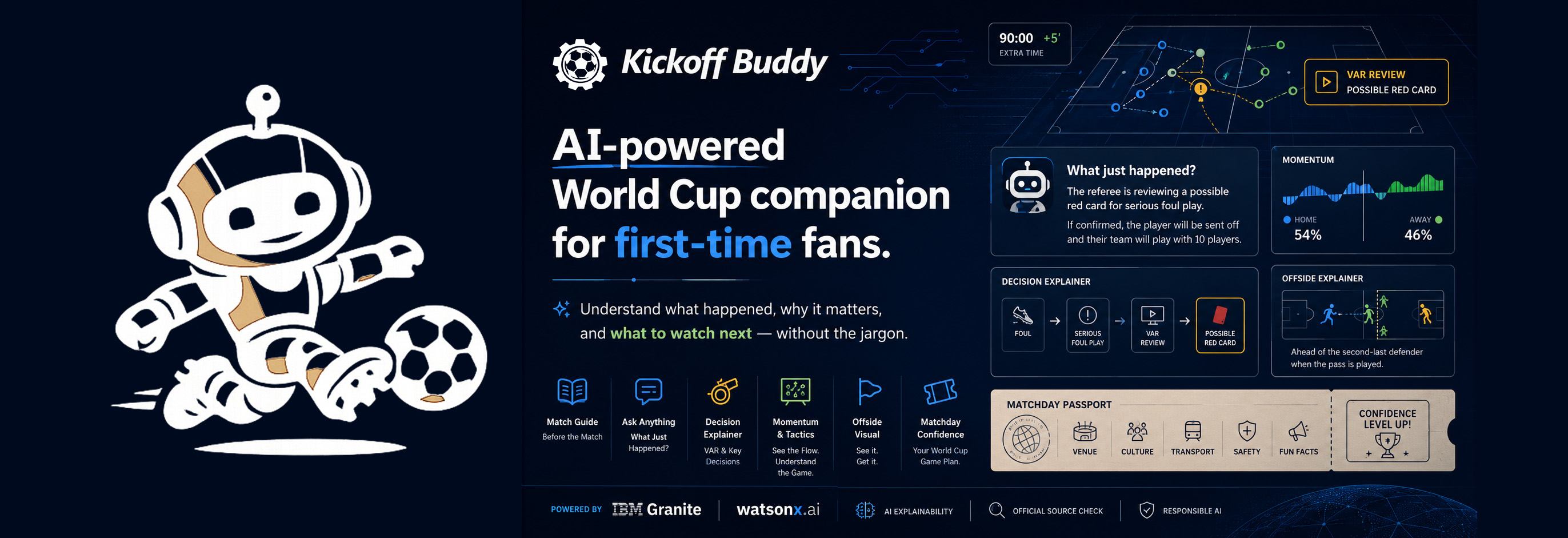
- Problem
- A first-time viewer can watch a goal get canceled without knowing which rule to look up. Finding an explanation during play requires vocabulary that newcomers may not yet have.
- Process
- I directed the concept and build with ChatGPT, IBM Bob, and Claude Code. Development combined interactive rule demonstrations, a two-stage AI workflow, and checks on how the app handled incomplete data and service failures.
- Result
- The deployed companion includes six AI features, an interactive offside demonstration, and a tactical board. It received Best Use of Technology in the June IBM Global AI Builders Challenge.
01′Kick-off
Watch the original demo
The walkthrough shows the original competition version, including match setup, explanations, and a matchday checklist.
Watch the demo on YouTube or explore the implementation on GitHub.
09′The Fan
Designing for someone new to soccer
I was the viewer I designed for. Watching highlights at home during the 2026 World Cup, I understood the goals and almost nothing else. For the IBM June Challenge, I focused on someone like that: joining a match because friends were watching or because they wanted to follow a team, with little experience of the game.
Quick-select situations such as “Goal canceled” and “VAR review” let viewers start with what they noticed. They can also type a question in their own words. I set a patient, direct tone for the responses, with explanations of unfamiliar terms.
These product assumptions grew out of early concept work with ChatGPT.
23′Match Experience
What viewers can do
The experience starts with a short setup. Viewers choose their familiarity with soccer, whether they are watching before, during, or after a match, and where they plan to watch. They can also select a match and what they want help with.
That context shapes the explanations across six features:
| Feature | What a viewer can do |
|---|---|
| Match Guide | Generate an introduction to the selected match, adjusted to their familiarity with soccer. |
| Ask What Just Happened | Type a question or choose a common situation to get an explanation using the available match context. |
| Decision Explainer | Explore rules behind situations such as offside, handball, penalties, and video reviews. |
| Momentum & Tactics | Describe a shift in play, build an example with match events, and explore formations on a tactical board. |
| Choose My Team | Select interests such as underdog stories or attacking play and receive recommendations, alongside available recent results and upcoming fixtures. |
| Matchday Confidence Guide | Create a checklist for watching at home, joining a watch party, or attending a stadium, with reminders to confirm details through official sources. |
The navigation groups these activities by viewing context: Before the Match, During the Match, Offside Rule, and Fan & Matchday.
Exploring offside
A simplified pitch lets viewers move an attacker and defender, then play a pass to see how their positions affect the example. Preset scenarios cover an onside position, a clear offside position, and a close decision.
Exploring momentum and tactics
The momentum activity lets viewers add events such as a goal, red card, or substitution to a timeline. Each event changes an illustrative control meter. Viewers can also adjust the meter themselves and change formations or game plans on the tactical board.
Those choices supply context for the AI explanation. The meter’s percentages illustrate the viewer’s selections; they do not measure possession or live match performance.
Preparing for matchday
The checklist adapts to a stadium visit, watch party, or viewing at home. Selecting a recommended team can focus it on that team’s next available fixture; otherwise, the guidance stays general to the viewing setting.
For details such as ticketing, transport, and venue policies, the checklist directs viewers to official information. Match-specific link searches are limited to approved domains.
35′My Role
My role and AI collaboration
This project was built in collaboration with AI; the design decisions, content, and direction are mine. I did not write the code myself; I set the brief, reviewed each result, and decided what shipped.
I defined the concept, audience, feature set, visual direction, and tone, including how the app should handle missing information. Each change needed my review before acceptance.
The development tools had different roles:
| Collaborator | Contribution |
|---|---|
| ChatGPT | Helped explore the problem, discuss the needs of first-time viewers, and develop initial feature concepts. |
| IBM Bob | Generated the application architecture, front-end structure, interface and feature code, and initial API integration framework. |
| Claude Code | Reviewed the implementation, connected and debugged APIs, refined interactions, and assisted with security review. |
An interface could look finished while an API connection still failed, or an answer could read smoothly despite incomplete match information. I reviewed those parts separately before accepting a revision.
45′Original Architecture
How the original version produced an answer
Questions about a current match require information that a language model may not have in its training data. During development, confident answers about live events made this a practical concern.
I separated information gathering from explanation in the original AI workflow:
- Load available fixture and event records from football-data.org.
- Use GPT-4o web search for information relevant to the question.
- Pass the context to IBM Granite on watsonx.ai for the explanation.
Original competition version: AI workflow
Fan's question
The viewer’s question and selected context, with available match records from football-data.org.
Search for current information
OpenAI GPT-4o · /api/ai-searchGPT-4o used web search to gather information relevant to the match or the viewer’s preferences.
Write the explanation
IBM Granite · watsonx.ai · /api/aiIBM Granite, served through watsonx.ai, received that context and produced the response shown to the viewer.
Response for the viewer
An explanation using the available context, with instructions to acknowledge missing information.
Granite provided the final wording across all six AI features. When search contributed to an answer, a note identified its role.
The search step varied by task. Match explanations requested information about the selected game, while team recommendations looked for relevant tournament context. A match-focused checklist searched for official links. A general checklist for watching at home or attending a venue could go directly to Granite.
Working with incomplete information
The free match-data plan used for the project did not provide a minute-by-minute score stream. Web search added another source of current information, but it could still lag behind the broadcast or miss a specific incident.
I set the prompts to acknowledge when the supplied information could not confirm an event. In that situation, the model was instructed to explain the relevant rule or concept and make the limitation clear.
If web search failed, the app could still request an explanation from Granite using the remaining context. That response had less current information available.
These choices reduced reliance on the model’s memory for changing facts. They did not independently verify every statement it produced, so official match information remained important.
74′Service Reliability
Handling service failures and API access
One difficult debugging issue involved intermittent capacity errors from watsonx.ai. A failed request could appear to come from the application, the proxy, or the provider. Working through those layers with Claude Code helped identify where the failure occurred.
The Granite integration included up to three retries for temporary 429 and 503 responses. If the request still failed, the error returned to the interface. For capacity-related failures, the app displayed “Buddy is catching up” and asked the viewer to try again.
The implementation also included controls for public API use:
- Server-side credentials. The browser sent requests to the application’s backend, which held the provider credentials.
- Shared request limits. Both AI endpoints used a Redis-backed limit, configured by default to allow 30 API requests per IP address per hour. A search followed by a Granite response used two requests.
- Origin checks. The endpoints rejected browser requests from origins outside the allowed list.
- Checks before paid requests. If the rate-limit service was unavailable in production, the app declined the paid request.
The frontend was built with HTML, CSS, and JavaScript. A local Node.js proxy supported development, while Vercel serverless functions handled the deployed API routes.
Original competition version: system architecture
Frontend
Browser · pure static · no framework, no build stepBackend
Vercel serverless functions · local dev via proxy.jsExternal services
Match data & AI90′Full Time
Delivery and next steps
The June challenge version turned newcomers’ questions into situation buttons, guided inputs, and interactive examples. A future usability study using recorded match moments could examine whether those choices help viewers follow the game:
- Can someone find a useful explanation while following a match?
- Can they use the offside demonstration and explain the example afterward?
- Can they tell when an answer describes a general rule and when it refers to a confirmed match event?
- Does the amount of text fit the time they want to spend looking away from the match?
I learned to review an AI response together with its inputs and failure states. That made API behavior part of the design review.
Explore Kickoff Buddy
Watch the original demo or explore the implementation.